

MLS Listings API: How to Access MLS Listing Data
Key Takeaways
Getting MLS listing data is a permissions problem first and a coding problem second, so the fastest path starts with knowing which access route and license tier your product actually needs.
- Direct MLS feeds, vendor platforms, and normalized property data APIs deliver listings through very different contracts, timelines, and maintenance loads.
- The RESO Web API standardizes how you query and authenticate, but credentials are still issued one MLS at a time.
- Your license tier decides what you're allowed to build, and IDX data is licensed for public display rather than analytics.
- Throughput caps and refresh rules shape your sync architecture more than any single endpoint does.
Query real records in your own markets before you write integration code because that's the cheapest moment to find out a source won't work.
An MLS listings API is a programmatic interface that returns property listing records, including price, status, property characteristics, photos, and agent details, from one or more Multiple Listing Service databases. If you're building a search portal, a valuation model, or an internal analytics tool, it's how listing data moves from the MLS into your application without manual exports or brittle scrapers.
The catch is that there's no single MLS to connect to. There were 484 MLSs operating nationwide at the end of 2025, each with its own membership rules, license terms, and technical setup. So learning how to access MLS data means picking the route that fits your product, and for many teams, a normalized source of structured property and listing data is part of the answer.
What Is an MLS Listings API, and Who Needs One?
A multiple listing service API lets your software query listing records over HTTP, and it's used mainly by product teams building search, analytics teams modeling prices, and lending or fraud teams checking property status. You send a query, the server checks your credentials and permissions, and it returns matching records as JSON.
The group you're in decides the license you need and the route you can realistically take.
What Are the Main Ways to Access MLS Data?
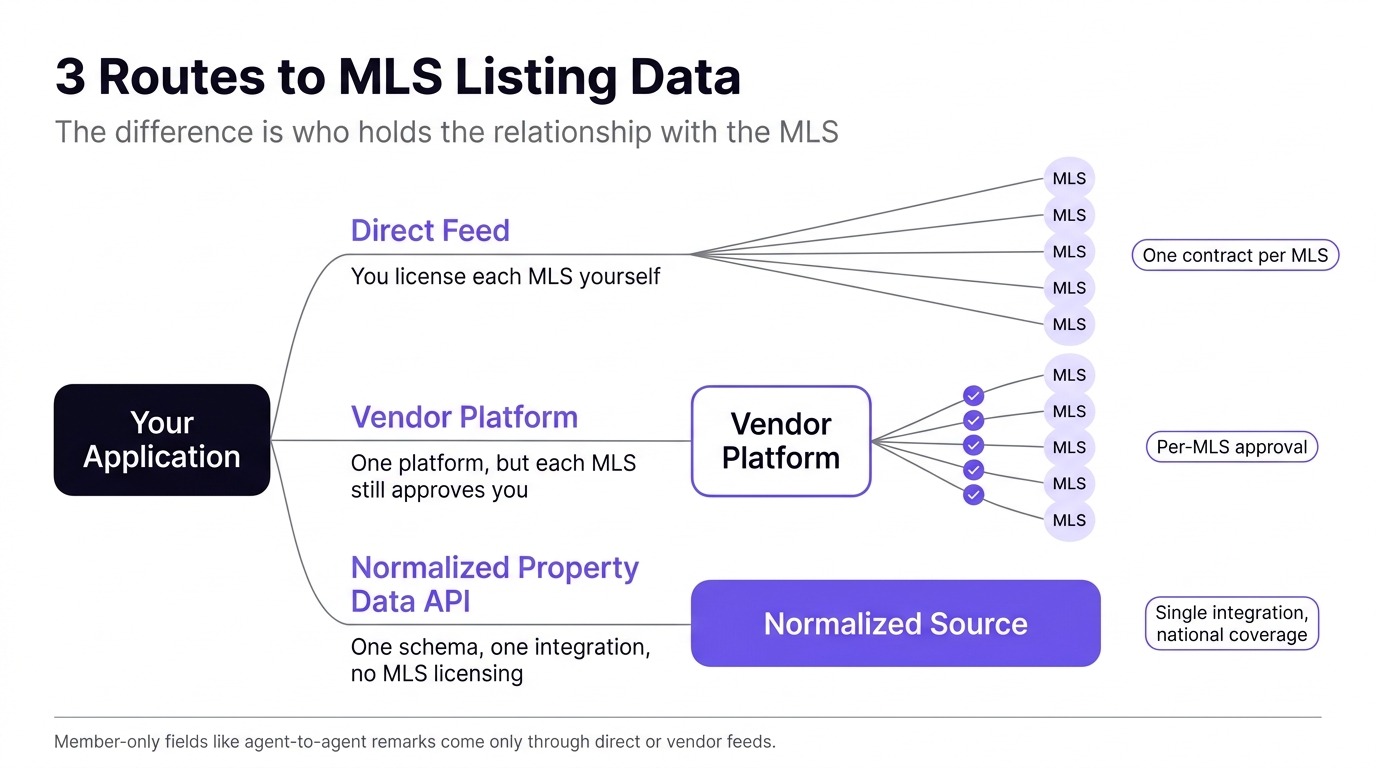
You can access MLS data in three ways: license a direct feed from each MLS, go through a vendor platform or aggregator, or use a normalized property data API that doesn't require MLS licensing. The three answers to how to access MLS data differ less in technology than in who holds the relationship with the MLS, and that relationship sets your timeline.
Direct Feeds From Each MLS
The direct route means licensing data from each MLS yourself, which generally requires being an MLS participant (a licensed broker) or a technology vendor approved to work on one's behalf. You apply, sign a data license agreement, and receive credentials for that MLS's feed. In return, you get the deepest field set your license allows and a direct line to the source.
The tradeoff is scope. Every MLS is a separate application, contract, and set of compliance rules, which works for one metro and gets heavy across a dozen.
Vendor Platforms and Listing Aggregators
MLS technology vendors and listing aggregators expose many MLSs through one multiple listing service API. You'll typically still need each MLS to approve your access, but the vendor handles transport, credentials, and some normalization.
If you're comparing providers at this layer, our guide to choosing an MLS database API discusses coverage verification, pricing models, and evaluation questions in depth.
Normalized Property Data APIs
The third route skips per-MLS licensing entirely. A property data API blends web-collected listing data with public records and other sources, standardizes everything into one schema, and delivers it through a single integration with national coverage.
You won't get member-only fields like agent-to-agent remarks. You will get listing status, price history, and property characteristics without negotiating market by market. For analytics, enrichment, and monitoring, this route often fits better than a broker feed, since display licenses were never written for those uses.
mls listings api
How Do You Get MLS API Access, Step by Step?
You get MLS API access in six steps: choose your license tier, map your markets to MLSs, sign each data license, receive credentials, read the metadata, then replicate and sync. Here's what each step looks like on the direct or vendor route.
- Define your use case and license tier. IDX covers public display on a broker's site, VOW covers logged-in consumer portals, and broker or back-office feeds cover internal tools. Pick the tier your product requires. Our breakdown of IDX vs MLS API access explains where each tier ends.
- Map your markets to MLSs. List the metros you need, then identify every MLS that serves them. Border areas often fall under two or more systems, which is where duplicate listings come from later.
- Apply and sign the data license. Each MLS reviews your use case and sets its own fees and terms. RESO notes that credentials come from local MLSs only after you agree to their data use and licensing policies.
- Receive credentials and authenticate. Most MLSs issue OAuth client credentials or a bearer token tied to your approved role, managed separately per market.
- Read the metadata before you query. The metadata endpoint shows which resources and fields that MLS exposes to your role. Map them to your schema before writing ingestion logic.
- Replicate once, then sync incrementally. Pull the full dataset one time, then request only records whose ModificationTimestamp is later than your last run. Re-pulling everything on every cycle wastes throughput and often hits limits.
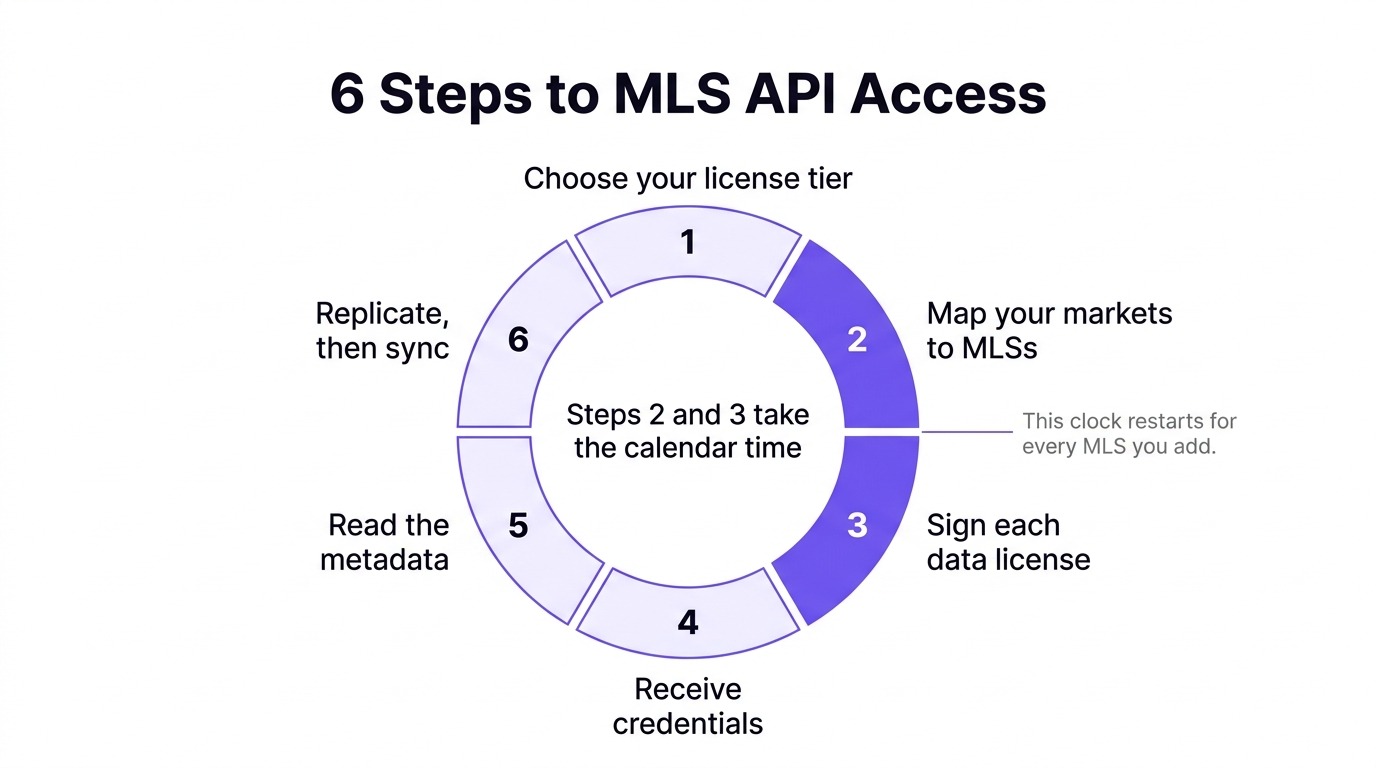
None of these steps is technically hard. The calendar time goes into steps two and three, and that clock restarts for every MLS you add.
How Does the RESO Web API Work?
The RESO Web API works like most modern REST APIs: you authenticate with an OAuth token, send OData queries over HTTPS, and get JSON back using field names defined by the RESO Data Dictionary. It replaced RETS, the older XML-based protocol, as the standard MLSs expose to approved data recipients.
OData Queries and the Data Dictionary
Queries use standard OData parameters such as $filter, $select, $orderby, and $top, so filtering, field selection, and paging happen in the query string. The Data Dictionary defines shared names for common fields such as ListPrice, StandardStatus, and ListingId, which is why code written against one certified MLS mostly works against another.
That standardization is partial. Anything an MLS hasn't mapped to the Dictionary arrives as a local custom field that differs by market, so plan for a mapping layer even when every source is certified.
Roles, Tokens, and What You're Allowed to See
Your token determines what you see, not only whether you get in. Authentication on a multiple listing service API does double duty: the token proves who you are, and the role attached to it controls which records and fields come back, so two developers hitting the same endpoint can get very different payloads.
A successful test call doesn't mean you're production-ready. Confirm that your role matches the tier in your license, and check which fields come back empty before you build features around them.
What Data Do You Actually Get From an MLS Listings API?
You get the listing record itself plus photos, agent and office details, and open house events, split across a few standard RESO resources. Which fields actually arrive depends on the role tied to your license.
- Property: the listing record itself, including price, status, address, beds, baths, square footage, lot size, and public remarks.
- Media: photo and virtual tour URLs, usually delivered as a separate resource you join to the listing.
- Member and Office: agent and brokerage details used for attribution and contact display.
- OpenHouse: scheduled open house events attached to active listings.
MLS data covers properties that have been listed, so homes that never hit the market are missing, and ownership and assessment details are often sparse. Evaluating properties that aren't for sale requires public-record or aggregated sources alongside the feed.
How Do Rate Limits and Sync Rules Shape Your Integration?
Rate limits force you to build throttling and retry logic, and IDX display rules set a minimum refresh cadence. Together, they decide how your ingestion pipeline gets built. Neither usually comes up in a sales conversation.
Direct feeds and vendor platforms commonly cap requests per second or per hour, and limits vary by provider. Exceed them, and you get throttled, which means building backoff logic, retry handling, and a queue to smooth out bursts. Initial replication of a large market is usually where teams hit the ceiling first.
Display rules add a second constraint. Under NAR's IDX policy, IDX downloads must refresh at least every 12 hours, and IDX-provided listings can't be used for anything other than IDX display. If your sync can't meet the refresh rule, you're out of compliance even when your code works perfectly.
The sync pattern that holds up across every source is a scheduled delta query. Store the timestamp of your last successful pull, request only records updated since then, and advance that watermark after each run. When an MLS listings API has no per-second caps, your team skips the throttling code and sizes each run around freshness needs instead of vendor limits.
Why Should You Explore MLS Listing Data Before Writing Integration Code?
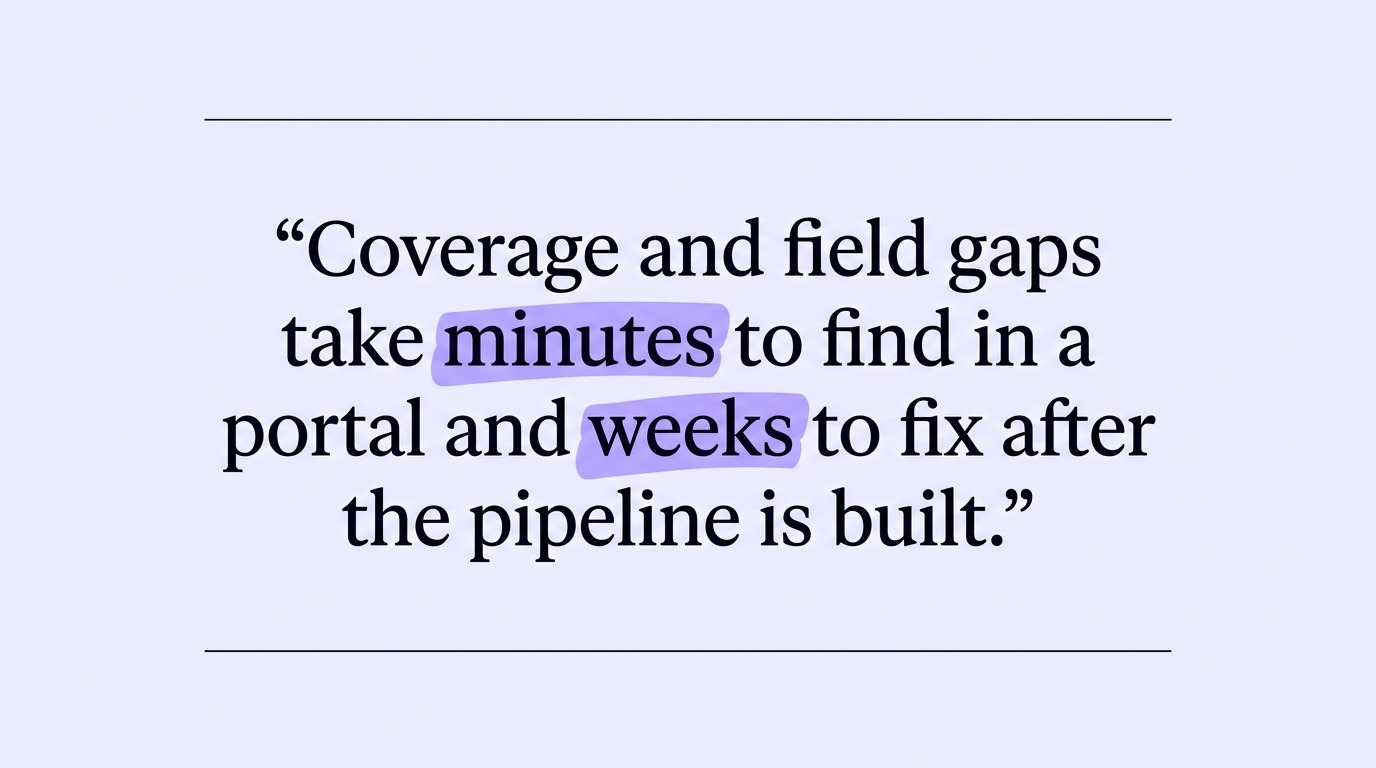
You should explore the data first because coverage and field gaps take minutes to find in a portal and weeks to fix after the pipeline is built. Looking at real records before you code is the cheapest insurance an MLS integration has.
What a Visual Data Portal Lets You Check
A web portal that lets you search and filter real records, open full-detail views, and export samples turns evaluation into an afternoon of hands-on work. Your analyst can confirm coverage in target markets without waiting on engineering. Your developers can see how a filter behaves and what a record looks like before building the MLS listings API call that reproduces it.
Here's what's worth checking in that first session:
- Record counts for each metro or ZIP code you plan to launch in.
- Fill rates on the fields your features depend on, such as sold price or days on market.
- How status values are labeled, and whether pending and sold are clearly distinguishable.
- Whether the same filter returns the same records in the portal and through the API.
Why Gated Evaluation Slows You Down
Gated evaluation slows you down because you have to commit before you can see how the data behaves. Many providers put their data behind a demo request and their documentation behind a sales call, so you end up committing on the strength of a slide deck, then learning how the data behaves during integration, when switching is most expensive.
A self-serve portal paired with public docs reverses that sequence. You validate first, negotiate second, and your first API call reproduces a query you've already seen work.
What Blockers Stall Most MLS Integrations?
The blockers that stall most MLS integrations are approval timelines, duplicate listings across overlapping MLSs, and schema changes caused by MLS consolidation. All three show up even when your route and credentials are right.
Approval Timelines You Don't Control
Approval speed depends on each MLS, not your team. For the simplest tier, NAR policy says MLSs must act on IDX feed requests within five business days, barring extenuating circumstances. Deeper tiers involve more review, some require a brokerage relationship, and multi-market projects multiply every wait, so start licensing conversations before your engineering sprint does.
Duplicates Across Overlapping MLSs
A property near a service-area boundary can be listed in two MLSs at once, with different IDs and slightly different details. Without deduplication keyed on a normalized address or parcel number, search results double-count and market stats drift.
Consolidation and Schema Changes
MLS mergers are ongoing, and each can change endpoints, listing IDs, field mappings, and license terms. The U.S. had 30 fewer MLSs at the end of 2025 than a year earlier, which means integrations built against a single system can lose their source mid-contract. Build ingestion so a source can be swapped without rewriting downstream logic.
Frequently Asked Questions
Is there a free MLS listings API?
Not in the sense of open, unlicensed access. MLS data belongs to the MLS and its participants, so direct feeds come with license terms and usually fees. What you can often get free is evaluation access, since many normalized data providers offer trials on real records.
How much does MLS data access cost?
It depends on the route. Direct feeds carry license fees set by each MLS, and vendor platforms often add their own per-MLS data plan fees on top, so costs scale with every market you add. Normalized property data providers typically price by record volume instead of by market.
Can I use IDX data for analytics or lead scoring?
Generally, no. IDX licenses cover public display on a participating broker's website or app, and modeling, resale, or internal scoring falls outside that permission. Analytics needs a license that explicitly covers it or a source that isn't governed by IDX display rules.
What's the difference between RETS and the RESO Web API?
RETS was the industry's older, XML-based transport protocol, and it relied on specialized client libraries and heavy local replication. Its replacement is a RESTful, OData-based standard that returns JSON and uses token-based authentication. RESO no longer supports RETS, so new integrations should target the Web API.
Choose Your Access Route Before You Write Code
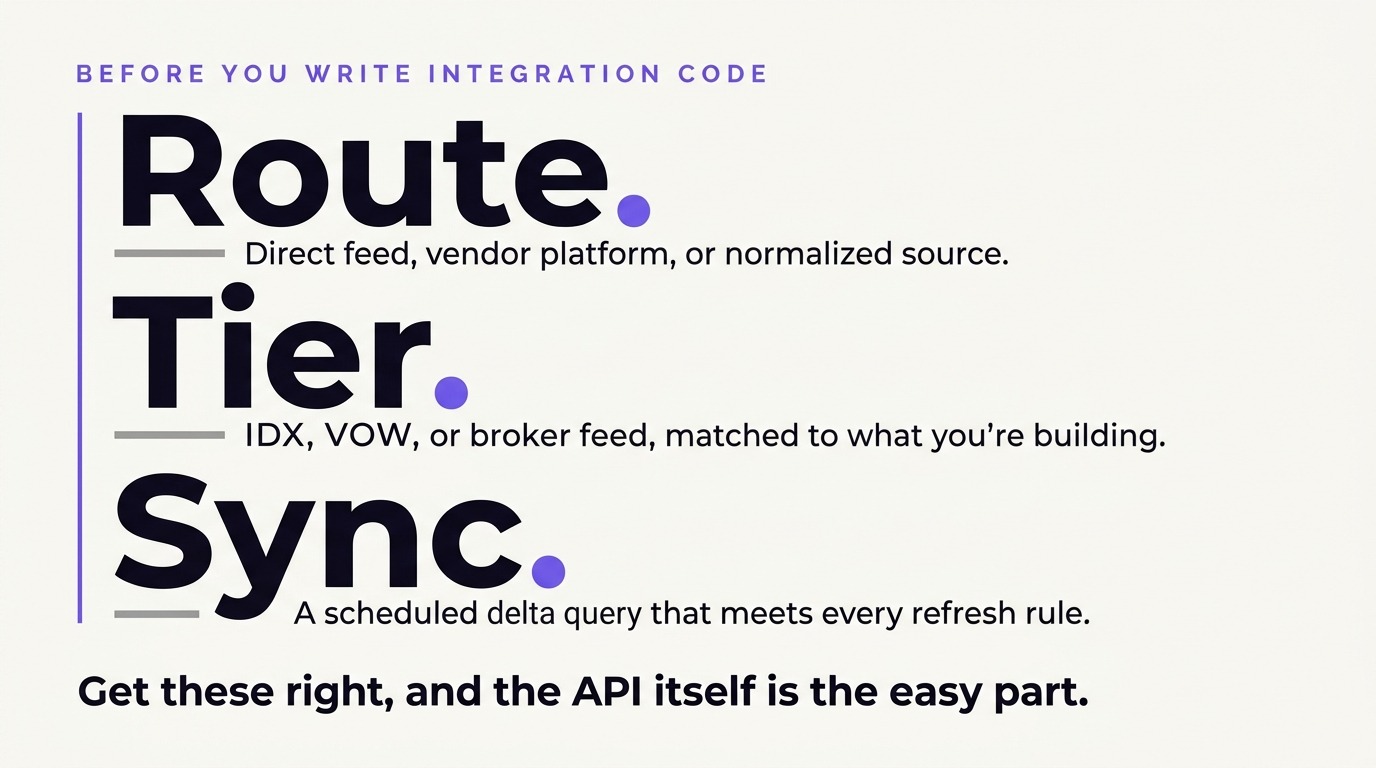
Knowing how to access MLS data comes down to the route, license tier, and sync pattern. Get those right, and the API itself is the easy part. Get them wrong, and you'll rebuild, relicense, or both.
Write down what your product needs to do with the data, then match that need to a route. If you need broker-level fields in one or two markets, go direct. If you need national coverage for analytics, enrichment, or monitoring, evaluate a normalized source first, and query real records before you commit.
Datafiniti's Property Data platform gives you a visual web portal to explore real records and build queries before you write integration code, with residential, commercial, and industrial coverage nationwide under one integration, no rate limiting, public documentation, and billing based on the records you actually receive. The free trial includes 1,000 property records and the same API behavior you'd get in production. Request a demo to test it against the markets you care about.
Read the latest articles

Read more

Best Property Data API Platforms for U.S. Real Estate: A Buyer's Comparison

Best Product Catalog API for Online Retailers: Aggregating Multi-Retailer Catalogs

Build vs Buy: Business Data Enrichment for Growing Teams

Company Data API Pricing: Bulk & Enterprise-Scale Access

Best Business Data APIs for Sales Teams & Prospecting

Business Data API: Company Data at Enterprise Scale

How to Build a Product Database With a Product Data API

Property Data API Coverage: What U.S. Datasets Include

Product Data API for Ecommerce Price Monitoring and Repricing

Real-Time Product Data API for Product-Led Growth Teams

Property Ownership Data API for Skip Tracing and Lead Gen

How APIs Make Building a Product Database Easy
Learn how to build a product database with APIs for cleaner imports, updates, search, and scalable product data.

How to Leverage Competitor Pricing Data with an API
Use competitor pricing data to build API-driven monitoring, analysis, and smarter pricing decisions.

Price Monitoring API: The Key to E-Commerce Pricing Strategy
Use a price monitoring API to track market changes, improve pricing decisions, and protect ecommerce margins.

How do Product Data APIs Work for E-Commerce Companies?
Learn how a product data API works, from collection and queries to ecommerce integration and use cases.

GTIN Lookup API: Search Products by Barcode & UPC at Scale

Best Real Estate API 2026: Coverage, Pricing, Data Quality

Best Product Data API 2026: A State-of-the-Market Guide

Product Data API Integration Patterns for Ecommerce Platforms

Build a PropTech MVP With a Property Ownership Data API
How Real Estate Agents Can Leverage Proptech Data
Leverage proptech data to source leads, speed up valuations, and manage risk with accurate, real-time property insights.

What Is a UPC Lookup API?
Learn about the UPC lookup API, how it works, and its benefits for businesses. Get product data easily.

What Is a GTIN Lookup API?
Learn about the GTIN lookup API and how it can help your business grow. Get product data insights.

How Does a Property Data API Work?
Learn how a property data API works, its features, and how you can use it for real estate and business insights.

What The Best Real Estate APIs Should Have
Discover what makes the best real estate APIs stand out. Learn about essential features for your property data needs.
MLS Listings API: How to Access MLS Listing Data
.png)
How to Enrich Your Product Catalog With a Real-Time API
.jpeg)
Product Data API Buyer's Guide for Ecommerce Teams

Why Real Estate Tech Startups Need Property APIs with Ownership Details
Discover how property APIs with ownership details empower real estate tech startups. Learn about data integration, risk mitigation, and driving business value.
The Value of a Product Catalog Sync for Product Managers
Unlock the value of product catalog sync for product managers. Streamline data, improve decisions, and reduce costs with real-time insights.

What is a Product Data Webhook?
Learn about product data webhooks, their components, and how they enable real-time updates for business intelligence and workflow automation.

Why Is a Product Data API Integration Essential for Analysts & Product Managers?
Unlock insights with product data API integration. Essential for analysts & product managers to streamline data access & enhance product strategy.

What Is a Product Data API and Its Benefits
Learn about product data APIs, their benefits, and how they drive business growth. Explore integration and advanced use cases.

What Do eCommerce Data Vendors Do?
Learn what ecommerce data vendors do, their services, and how to choose the right one for your business growth.

How to Compare Product Data Providers: What to Look For
Compare product data providers. Learn what to look for in data quality, structure, and integration features.

How to Get Your Product Data in Real-Time Using APIs
Learn how to leverage real-time product data APIs for e-commerce, competitive analysis, and AI. Get instant access to clean, structured product data.

Best Product Data API: Features to Look for
Find the best product data API with real-time updates, comprehensive coverage, and a user-friendly portal. Explore features to look for.

Unlocking Property Data with an API
Access property data with a powerful property database API. Explore listings, market analysis, investment opportunities, and more. Get started today!

Unlocking CRE with APIs
Unlock commercial real estate insights with a powerful API. Access property data, streamline workflows, and enhance investment strategies.

How to Get a Real-Time Product Feed Using an API
Learn how to get a real-time product feed using an API. Access, leverage, and ensure accuracy of product data for your business needs.

Spying on Competitor Prices: What You Need to Know
Learn how to gather and analyze competitor pricing data to inform your business strategy. Understand key components and ethical considerations.

Product Data Enrichment: What Are You Missing?
Enhance your product data with comprehensive enrichment. Discover insights, drive growth, and choose the right approach for your business.
.png)
Real Estate API Pricing Models Explained: Subscription vs. Usage-Based

Real Estate API vs Web Scraping: The Buy-vs-Build Decision
.png)
Product Data APIs Explained: Powering Product Search and Catalog Automation

How to Get the Most out of a Product Catalog API
Learn how to leverage a product catalog API for business growth. Discover data quality, access methods, and strategy for your product catalog API.

Taming Your Ecommerce Product Data Feed
Optimize your ecommerce product data feed for growth. Learn strategies, leverage technology, and ensure data quality for better customer experience and AI initiatives.

Streamlining Your Product Search with an API
Explore the benefits and integration of a product search API. Streamline your product discovery and leverage data for business growth.

What Is a Real Estate Transaction Database? A Complete Guide
.png)
Commercial Real Estate API vs. Residential Property API
.png)
How to Choose a Real Estate Database API for Your MVP

Property Valuation API: Your Go-To Real Estate Tool
Leverage the property valuation API for real estate insights. Access comprehensive property data for diverse applications with Datafiniti.

Product Data APIs Explained
Learn about product data APIs explained. Discover how to access, integrate, and utilize product data for e-commerce, analytics, and more.

Unlocking Your Ecommerce Data with APIs
Unlock ecommerce data with APIs for business insights, product catalog enrichment, and competitive analysis. Explore data via portal or API.

Real Estate Ownership Data: How to Access, Analyze and Use at Scale
Access, analyze, and use real estate ownership data at scale. Learn how to find, process, and leverage this crucial information for business insights.

IDX vs MLS API: What Every Real Estate Professional Should Know

How a Property Database API Can Help Real Estate Pros
Learn how a property database API can help real estate pros analyze trends, monitor listings, and optimize strategies. Get data insights.

What Is a Residential Property API?
Explore what a residential property API is, its features, benefits, and real-world applications for real estate professionals and investors.

What Is a Commercial Real Estate API?
Explore commercial real estate API functionality, data integration, and use cases. Learn how to leverage property, business, and people data for insights.

Understanding MVP Data Integration
Learn about MVP data integration, its components, benefits, and strategies for accessing and utilizing data resources effectively.

How to Choose the Best Property Data API
Learn how to choose the best property data API. Explore features, providers, pricing, and integration for real estate insights.

How Do Product Data APIs Work?
Understand how a product data API works, its key features, integration methods, and applications for e-commerce and business intelligence.

How Do Data Aggregation Platforms Work?
Explore how data aggregation platforms work, their capabilities, and applications. Learn to choose and implement the right platform for your business intelligence needs.

Why Do Companies Need Property Data Aggregation?
Discover why property data aggregation is crucial for businesses. Streamline access, empower functions, enhance risk management, and drive strategic decisions with authoritative insights.

MLS Database API: How to Choose a Provider and Get Access

Product Search API vs. Product Data API: What's the Difference?

What Is a Product Data API?
Explore the functionality and benefits of a product data API. Learn how to integrate, leverage, and choose the right provider for your business insights.
What Is the Difference Between Product Search API and Product Data API?
Understand the difference between Product Search API and Product Data API. Learn how to leverage product data for business intelligence and analytics.

What Is a Property Data API?
Explore the capabilities of a property data API. Understand its core functionality, key features for developers, and how to access property information at scale for business insights.
.png)
Real Estate API Pricing: What You Need to Know Before You Build
.jpeg)
How to Choose a Property Market API for Investment Platforms
Choosing the right property market API is critical for investment platforms. Learn how to evaluate data depth, coverage, freshness, and integration quality before you commit.
Data you can trust, delivered in a format your systems can use, at the scale your product requires.